⏻
Boot & initialization
Multiboot2, x86_64 long mode, GDT/IDT with a full exception set, PIT at 1000 Hz, Local + I/O APIC, and PS/2 keyboard & mouse drivers.
A 64-bit operating system written from scratch in C and x86_64 Assembly — preemptive multitasking, a windowed desktop, a real TCP/IP stack, and an EXT2 filesystem. No libraries. Just the metal.
NyxOS boots via Multiboot2 (GRUB-compatible), enters long mode with 4-level paging, and provides a clean foundation for kernel development: a preemptive scheduler, ring-3 userspace with ELF64 and syscalls, a windowed GUI, and a from-scratch network stack — all built up one honest, verified increment at a time.
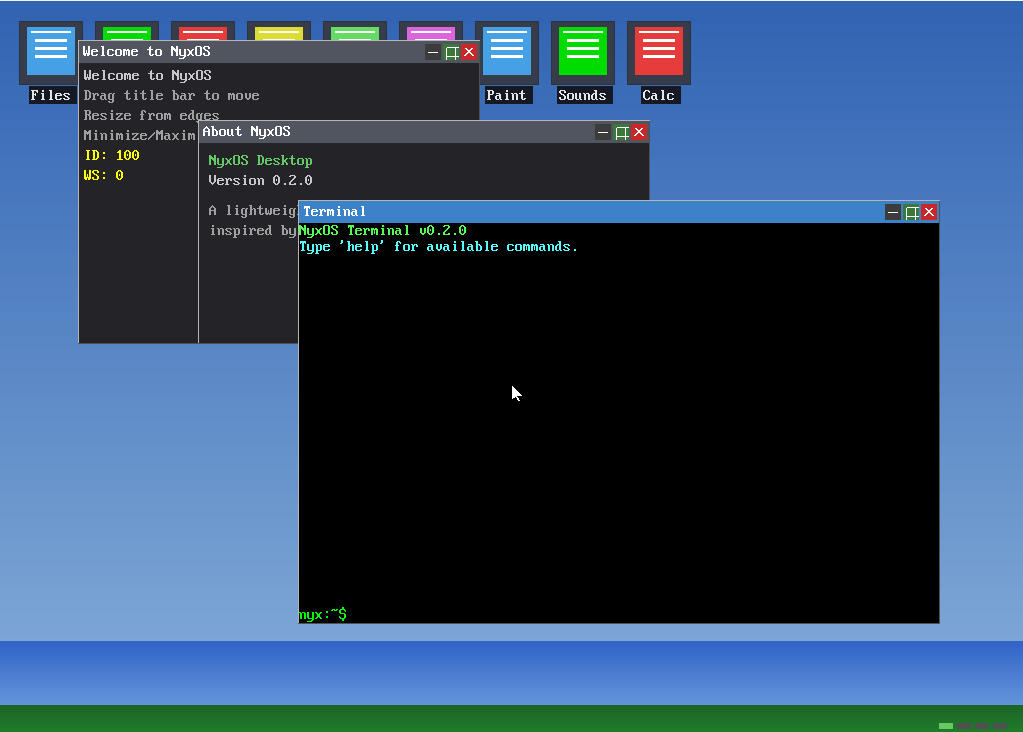
Every subsystem is written from scratch and verified in QEMU.
Multiboot2, x86_64 long mode, GDT/IDT with a full exception set, PIT at 1000 Hz, Local + I/O APIC, and PS/2 keyboard & mouse drivers.
Bitmap physical allocator, a 16 MB kernel heap, 4-level paging with a higher-half mapping, per-process page tables, and NX + SMEP hardening.
Preemptive weighted round-robin over kernel threads and ring-3 processes, with full shell job control — exec, spawn, jobs, wait, kill, nice.
An ELF64 loader, an embedded initramfs, fork() with copy-on-write, 10 syscalls via syscall/sysret, a minimal libc, isolated per-process file descriptors, and the 🌙 Nyx C language runtime for first-class userspace programming.
40+ built-in commands with Tab completion, environment-variable expansion, command history, output redirection, and pipes.
RTL8139 driver, ARP/IPv4/UDP/ICMP/DHCP/DNS, and a full TCP stack: retransmission with RTO, passive open (listen/accept), loopback, and an HTTP client & server.
Up to 32 windows with z-ordering, drag & resize, four workspaces, a taskbar and Start menu — plus a Terminal, File Manager, Editor, Paint and more.
A ramdisk VFS with an EXT2 read/write driver auto-mounted at /mnt, per-fd byte offsets, and persistence across reboots on a disk image.
A Bochs VBE framebuffer (1024×768×32), a Sound Blaster 16 driver (DMA + IRQ + mixer), PC-speaker tones, and a DOOM port with sound.
A higher-half kernel, isolated user address spaces, and an interrupt-driven core.
The PIT (ISA IRQ0) is routed via the I/O APIC on pin 2 → vector 32, driving a 1000 Hz tick. The scheduler preempts on that tick; syscalls and IRQs switch CR3 on entry so each process sees only its own address space.
Build the kernel, boot it in QEMU, and log in.
# cross-compiler (x86_64-elf-gcc) or host gcc -m64
git clone https://github.com/kazah-png/nyx-os.git
cd nyx-os
make -C kernel # → kernel/nyx-kernel.bin.\build.ps1 # WSL cross-compile → kernel + bootable ISO# GUI desktop + networking + disk
qemu-system-x86_64 -cdrom NyxOS.iso -m 256M -no-reboot \
-hda ext2-test.img -nic user,model=rtl8139 -display sdlServe HTTP from the guest by forwarding a host port: add hostfwd=tcp::8080-:80 to the NIC, run tcpserve 80, then curl localhost:8080.
The boot animation leads to a framebuffer login screen. The default account is nyx / nyx (PBKDF2-HMAC-SHA256). On success, the NyxOS Desktop launches; with no disk, it falls back to a text shell.
The built-in shell — also available in the Terminal window.
| Category | Commands |
|---|---|
| System | help clear nyxfetch uname date version reboot history env export |
| Files | ls cd pwd cat touch mkdir rm cp mv head tail grep sort wc find tree write which diff hexdump |
| Processes | ps mem exec spawn jobs wait kill nice renice usertest |
| Network | ifconfig dhcp ping setip httpget tcptest tcpdrop tcploop tcpserve |
| Filesystem | mount · EXT2 auto-mounts at /mnt |
| Graphics & sound | gui desktop mode fonttest beep play sb16play |
From the NIC driver up to an HTTP server — every layer written and debugged from the wire.
Selected milestones from a from-scratch kernel to a networked desktop OS.
Base kernel, ramdisk VFS + shell commands, and the first real networking (RTL8139, ARP/IP/UDP/ICMP).
Preemptive multitasking, a full TCP stack, the window compositor, PC-speaker audio, EXT2 read support, and a Sound Blaster 16 driver.
ELF loader, initramfs, per-process paging, ring-3 execution, syscalls, an RTC driver and a minimal libc.
Full x86_64 long mode, higher-half kernel, user/kernel page-table isolation, and NX + SMEP with APIC init.
A full GUI app suite, a boot animation + login screen, security hardening of the syscall boundary, and ring-3 userspace that actually runs.
Preemptive scheduling with job control & nice, per-process fds, drag-and-drop in the File Manager, and a networking sprint: loopback + ICMP, TCP retransmission, multi-segment receive, passive open, and an HTTP server that answers real clients.
Nyx C — a Go/Zig-inspired typed subset of C that transpiles to C and links against the nyxrt runtime. The first .nyx program prints "hola desde nyx c! pid=5" via string interpolation and direct syscalls.
SYS_WAITPID (11) — a ring-3 parent reaps its children and collects their exit codes.
pipe() (SYS_PIPE, 12) with kernel ring buffers, reference-counted ends, and blocking read() — real cross-process IPC. Per-process syscall stacks enable true blocking in ring 0. Current: v5.8.3.
NyxOS is developed in the open, one verified increment at a time. Join the Discord for kernel-dev chat, or dive into the source and status report on GitHub.